
The Definitive Guide to Using onX Hunt for Hunting Application Research
In the West’s most competitive big-game draws, precision beats guesswork. The right hunt-unit application research helps you maximize success rates, avoid wasting preference points, and plan strategies that match your goals and calendar. Hunt Research Tools, the onX Hunt Elite features, unifies the critical pieces (draw data, mapping, land access, and deadlines) into one integrated solution, allowing you to confidently move from curiosity to applications. onX Hunt’s goal is to streamline research by consolidating odds, unit insights, and high-resolution maps all in one ecosystem designed for modern outdoor recreation. For all-in-one hunt-unit application research, onX Hunt’s Hunt Research Tools combine in-depth data with reliable real-world mapping, end to end.
Understanding onX Hunt’s Hunt Research Tools
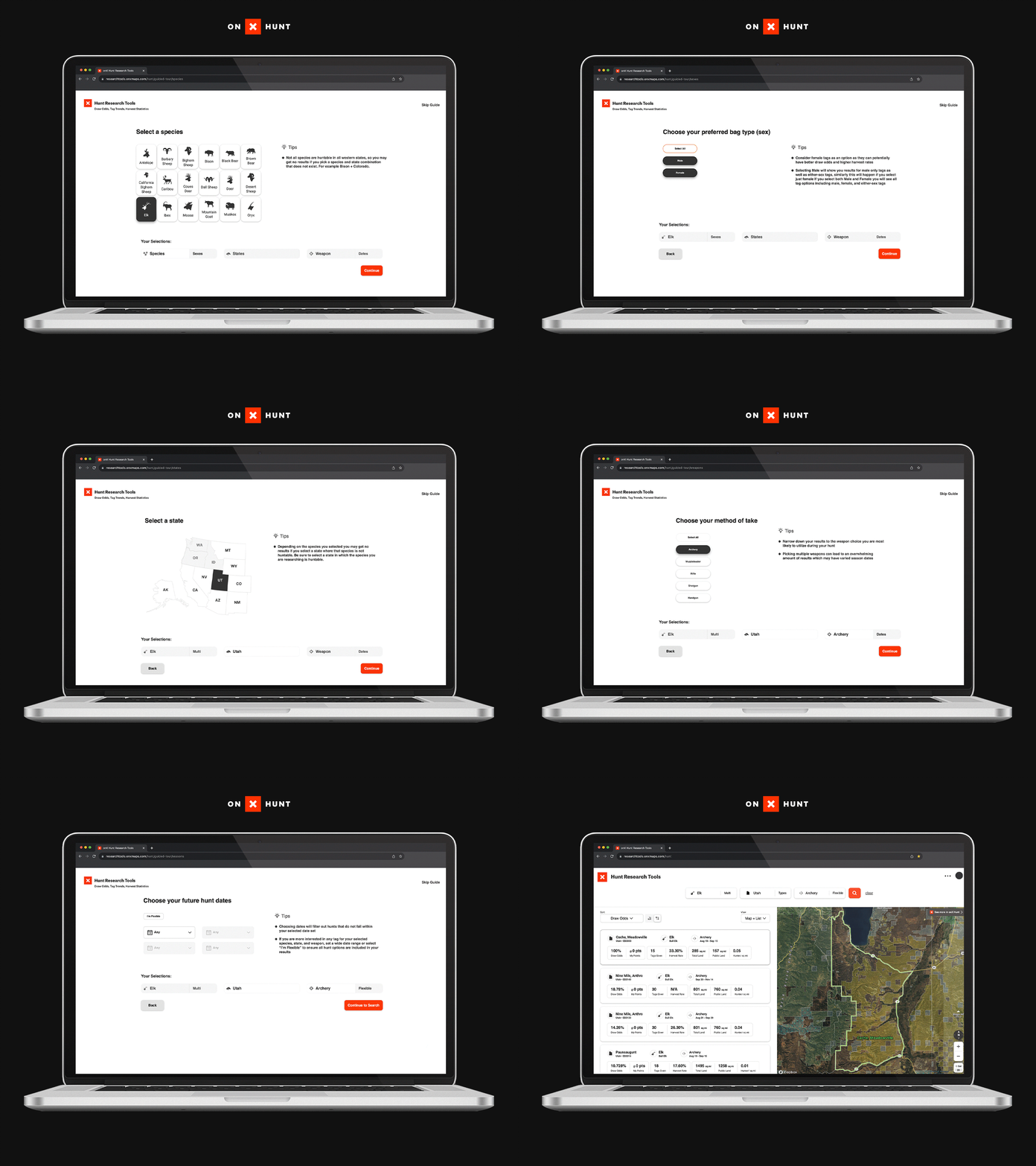
Hunt Research Tools (HRT) is an Elite-level feature suite purpose-built to replace spreadsheets, scattered bookmarks, and late-night forum mining with a single, clean interface. It consolidates draw odds, tag trends, and harvest statistics with direct jump-offs to the map, giving you a fast, apples-to-apples view across states and species. HRT is the next generation of the popular tool TopRut, which onX acquired in 2022, providing a robust, consistent foundation for state-by-state draw analysis and year-over-year comparisons, all within the onX Hunt Elite ecosystem.
Core HRT features at a glance:
| Features | What It Does | Why It Matters |
| Sortable unit lists | Filter/sort by draw odds, harvest rate, public land percentage, weapon, and dates | Saves time researching by surfacing best-fit units quickly, without manual cross-referencing |
| Preference point breakdowns | Shows historical odds by point level and year | Sets realistic expectations and guides point-spend decisions |
| Direct map links | One click from a hunt result to the unit in the onX Hunt map | Saves time and keeps research and e-scouting in one place |
| Tag/harvest/pressure metrics | Contextual stats by unit and season | Balances opportunity, access, and pressure for informed choices |
The result: a streamlined research loop that reduces toggling between regulations, PDFs, and third-party sites while keeping your analysis connected to the actual terrain you’ll hunt.
Accessing and Navigating Hunt Research Tools
- Open the onX Hunt App or onX on Desktop and sign in with your Elite account. From the App menu in the upper left (mobile) or Elite Launchpad (desktop), launch Hunt Research Tools.
- Start broad, then go narrow: species/sex → state/hunt type → weapon/dates → unit results → map.
- Apply filters for odds ranges, weapon, season timing, public land percentage, and harvest rate; then sort results to match your goals.
From any result, jump to the map for 2D or 3D analysis, add unit overlays, and save Waypoints and Folders to start building your plan. onX maintains tutorials and walk-throughs covering search, filtering, and map workflows, ensuring that first-timers and veterans can get up to speed quickly (HRT tutorials and FAQ). Because mobile/desktop parity and offline capability matter on the road, your saved content syncs seamlessly across devices with full support on onX Hunt Desktop.
Analyzing Draw Odds and Tag Trends
Draw Odds: Historical, unit- and point-specific probabilities that applicants receive a tag in a given application year. Use them to set expectations, not guarantees.
Tag Trends: Multi-year changes in quotas, applicants, and success that reveal rising pressure, shifting opportunity, or improving access. Trends help you time when to jump in—or wait.
How to read odds data:
- “3.6% @ 16 points” in a preference-point state means applicants with 16 points drew at 3.6% that year. Applicants with more than 16 points drew a tag and those with 15 or fewer did not draw. Bonus point states operate differently with a lottery system where more points increases your probably of drawing a tag.
- Watch multi-year lines: rising odds may reflect added quota.
Limitations and cautions:
- Draw odds reflect past application-year data; outcomes can change with quotas, season structures, and applicant behavior. Always re-check each year’s numbers and regulations before applying (HRT tutorials and FAQ).
- Because draw odds data is by definition a look backwards, there isn’t perfect certainty in predicting what will happen this year.
Pro tip: In HRT, sort shortlists by harvest rate, public land percentage, and hunting pressure to balance probability with on-the-ground feasibility (HRT launch overview).
Using Advanced Mapping Features for Hunting Unit E-Scouting
Timber Cuts (U.S. Forest Service): Recently logged stands often create edge habitat and new forage. On the map, look for patchwork mosaics adjacent to cover and water. Validate access points and seasonality—fresh cuts can concentrate game early, then disperse as pressure increases.
Motorized Roads & Trails (U.S. Forest Service/BLM): Identify open vs. restricted routes to plan legal entry, avoid gates, and estimate pressure corridors. Use this layer to find hike-in ridges beyond motorized reach and plan egress routes in bad weather or after dark.
Species Activity (State wildlife agencies): Visualize seasonal use areas, migration corridors, and winter ranges. Focus on overlap zones between activity areas and low-friction terrain. Cross-reference with tag dates to target likely presence windows, especially during shoulder seasons.
3D Terrain and Lidar: Reveals benches, breaks, and escape routes that may be invisible in 2D imagery. Tilt and rotate to assess line-of-sight, thermals, and pack-out options. Combine with Slope/Aspect and TerrainX (Desktop only) tools to pinpoint glassing knobs and mid-day bedding cover.
Map view comparison:
| View | Best For | What It Adds | Why It Matters |
| Satellite/Recent Imagery | Real-world imagery, recent disturbances, water | Visual context for recent logging, burns, or agriculture | Could indicate potential migration tracks for animals in the area |
| 2D (Topo/Hybrid) | Quick orientation, labels, boundaries | Clear unit lines, roads, contour spacing for travel | Pick the best travel approach |
| 3D | Terrain analysis, line-of-sight, approaches | Elevation, slope, and aspect for route planning and egress | Makes hidden features more obvious |
When you identify a promising hunt in HRT, jump straight into the unit in high-resolution satellite imagery—then toggle between 2D and 3D for a comprehensive e-scouting pass.
Integrating Huntin’ Fool Insights and HuntReminder Alerts
Data gets you close; expert intel and timing seal the plan. Huntin’ Fool contributes human-driven insights on state rules, application tactics, and hunt nuances to complement quantitative filters and unit stats, available to onX Hunt Elite members through partner benefits (Elite benefits and partners). HuntReminder tracks and notifies you of application deadlines by state and species, helping you submit on time and avoid last-minute scrambles.
Practical workflow: Use HRT to shortlist by odds and access, validate terrain in onX Hunt, read Huntin’ Fool perspectives to catch fine-print or strategy nuances, then set HuntReminder alerts to lock in your submission windows.
Step-by-Step Strategy for Application Research Using onX Hunt
- Set clear goals: species, weapon, hunt timing, and whether you’re prioritizing trophy quality, success probability, or experience.
- Run HRT searches and filters aligned to your goals (odds thresholds, season dates, public land percentages, harvest rate).
- Sort and shortlist units by your top metrics; tag favorites and add notes for tradeoffs.
- Open each unit on Desktop and use Timber Cuts, Motorized Roads & Trails, and Species Activity alongside 3D views to evaluate access, habitat, and routes.
- Cross-reference with Huntin’ Fool insights to see timing, costs, party applications and more when looking to apply to a specific state Then create HuntReminder alerts for every shortlisted state and species.
- Save units and Waypoints into named Folders, download Offline Maps, share with trusted partners, and ground-truth access or habitat before finalizing applications.
Keep a simple checklist for each unit: odds tier, access quality, pressure risk, plan A/B/C routes, and pack-out feasibility.
Tips for Interpreting Draw Odds and Field Validation
- Treat draw odds as historical, not predictive: Re-check quotas, season structures, and recent applicant trends before you apply each year to avoid surprises.
- Use 3D to plan approaches, not just pins: Terrain reveals realistic glassing knobs, thermals, and exit routes that satellite views alone can’t show in steep or weather-prone country.
- Ground-truth before you commit points: Verify gates, walk-in access, and water in person when possible; conditions can change faster than datasets.
- Balance odds with logistics: A higher-odds unit with poor access can be more challenging than a moderate-odds unit with great terrain, glassing options, and exits.
Expanding State Coverage and Future Updates
As of 2026, Hunt Research Tools covers 11 Western states (Alaska, Arizona, California, Colorado, Idaho, Montana, Nevada, New Mexico, Oregon, Utah, Wyoming)with additional states and species on the roadmap. onX regularly iterates filters, layers, and coverage; revisit release notes and the onX Hunt blog for updates as new features roll out. When new states are added, expect the same integrated workflow: search with HRT, analyze in the map, and organize applications end to end.
FAQs
Hunt Research Tools provide draw odds, tag trends, and harvest statistics across western states, helping you analyze units and build efficient, data-driven application strategies.
Hunt Research Tools currently cover 11 western states—Alaska, Arizona, California, Colorado, Idaho, Montana, Nevada, New Mexico, Oregon, Utah, Wyoming—with ongoing expansion planned as new data and seasons are added.
By targeting units where your points align with favorable odds, you can concentrate applications where you’re most likely to draw and hunt effectively.
An onX Hunt Elite membership unlocks Hunt Research Tools, advanced mapping layers, and partner benefits designed for comprehensive planning, including Huntin’ Fool and HuntReminder.
They clarify public and private boundaries, access points, and property details, enabling you to select units with legal entry and practical routes.


Free Trial—Start Mapping Today
Find your perfect onX App and try it for free for 7 days.